
What it does
Sortbook keeps the folders you choose tidy using recipes you switch on in one click. Every recipe is an ordinary rule underneath, so you can open it, point it at another folder and change it in plain language. Nothing is deleted: files move to a staging area, and every action has its own undo.
Recipes you switch on, not rules you write
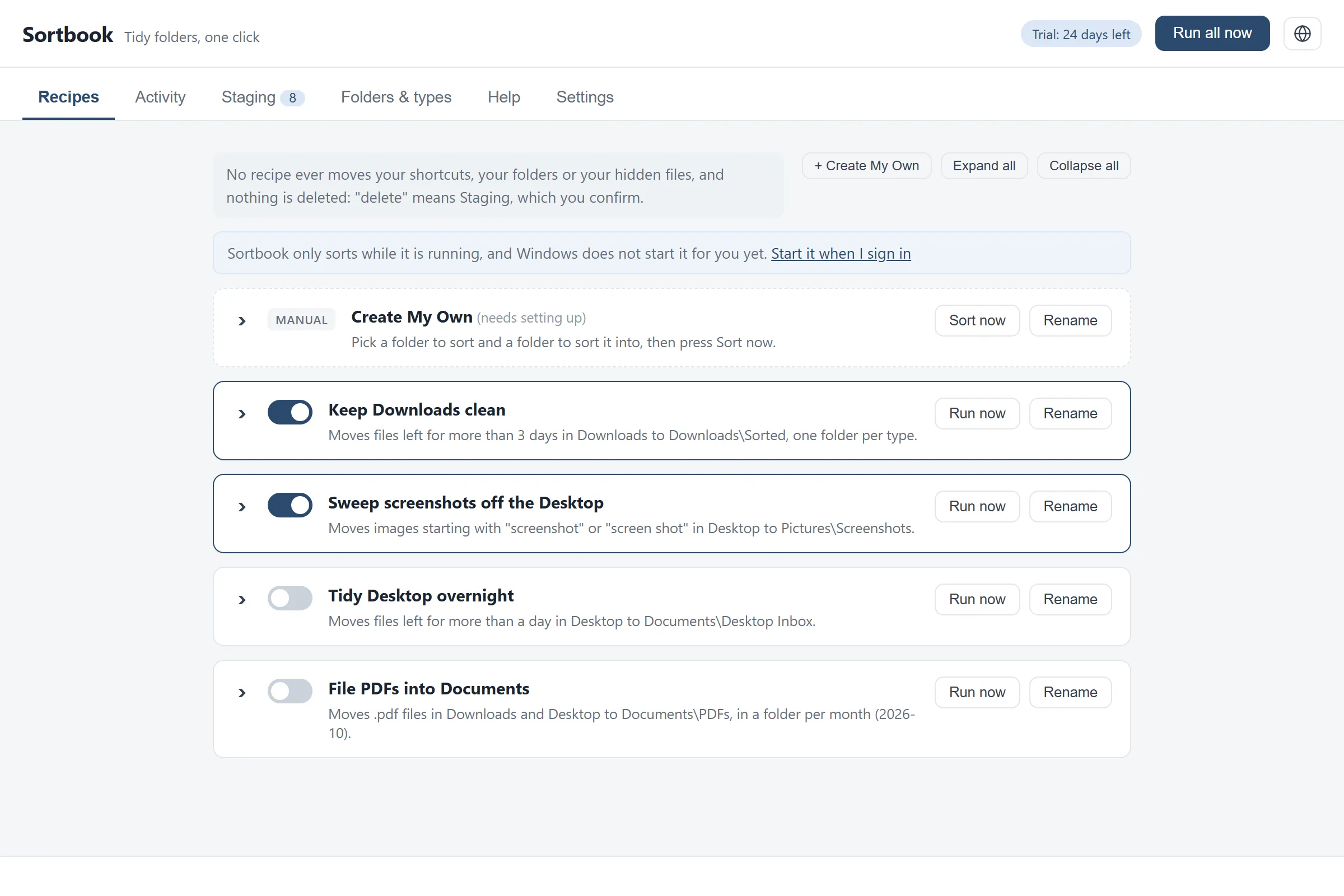
Sortbook ships ten recipes. Nine are named and ready to switch on (keep Downloads clean, sweep screenshots off the Desktop, file PDFs into Documents, collect invoices and receipts, and five more), and the tenth is blank, for a folder of your own. You turn one on and it runs immediately, on what is already sitting in the folder. There is no rule syntax to learn and nothing to configure first.
Every recipe opens into a plain-language editor
Any recipe can be opened and changed: which folders it watches, which kinds of file it takes, how long it waits, what it must never touch, and where things end up. It is presented as questions rather than as a rule language, and a live sentence shows what your changes will do before you save them. Files go into per-type, per-month or per-year folders.
Nothing is deleted
Delete in Sortbook means move to staging. Files wait there for 30 days, visible, and are only ever removed when you select them and confirm twice. It is the one permanent delete in the product and it never runs on its own.
Undo that stays undone
Every action Sortbook takes appears in a log with its own Undo. Put a file back and Sortbook pins it, so no recipe will move that file again however well it matches.
It never moves your shortcuts
A Windows Desktop is mostly shortcuts. Sortbook refuses to move them, and refuses folders, hidden files and part-finished downloads too, whatever a recipe says. Each recipe states this on its own card.
It finds your real folders
If OneDrive has moved your Desktop, Documents or Pictures, Sortbook follows them. It asks Windows where your folders are rather than guessing, and if a folder is genuinely missing it says so instead of quietly doing nothing. It leaves cloud-only files alone.
Questions
Will it move something I still need?
Recipes can wait before acting. Keep Downloads clean leaves a file alone for three days by default, and every move has its own undo. Put a file back once and Sortbook will not move it again.
What happens to files it decides to delete?
Nothing is deleted. They move to a staging folder and sit there visibly for 30 days. You delete them yourself, from inside Sortbook, and it asks twice.
Does it work if my Desktop is in OneDrive?
Yes. Sortbook asks Windows where your folders are rather than assembling the path itself.
Will it move my desktop shortcuts?
No. Shortcuts, folders, hidden files and part-finished downloads are refused by the engine rather than by each recipe.
Can I write my own rules?
Yes. One of the ten recipes ships blank, and a button adds another blank one whenever you want it: you pick the folder to sort, the folder to sort into, and the conditions. Any of the nine named recipes can be edited the same way: folders, file kinds, waiting time, exclusions and destination.
What happens when the trial ends?
Sortbook stops sorting. Nothing is moved or deleted, and undo and staging restore keep working, so you can always get your own files back.
Does it need an internet connection?
No. The privacy page carries the careful version of this answer, which is more precise than a yes or a no.
Is there a macOS build?
Not today.
Privacy
What it collects: Sortbook collects nothing. There is no account, no login, no backend and no analytics, so there is no mechanism by which it could collect anything and nowhere for it to go. What leaves your machine: Sortbook has no account, no backend and no analytics, and its own program has no networking code compiled into it at all. It does not upload your files or your file names anywhere. Its window is drawn using Microsoft's WebView2, a Windows component we do not control, so we describe what Sortbook does rather than making a promise about your whole machine.
Read the full Sortbook privacy pageRead the Sortbook licence agreement
What it costs
Free for 30 days, then Sortbook stops sorting until you buy it. Your files stay where they are, and you can still undo anything it did.
A one-time purchase, not a subscription.
Also from the studio
Questions or problems: support@hardboundstudio.com. A person reads every message.