What it does
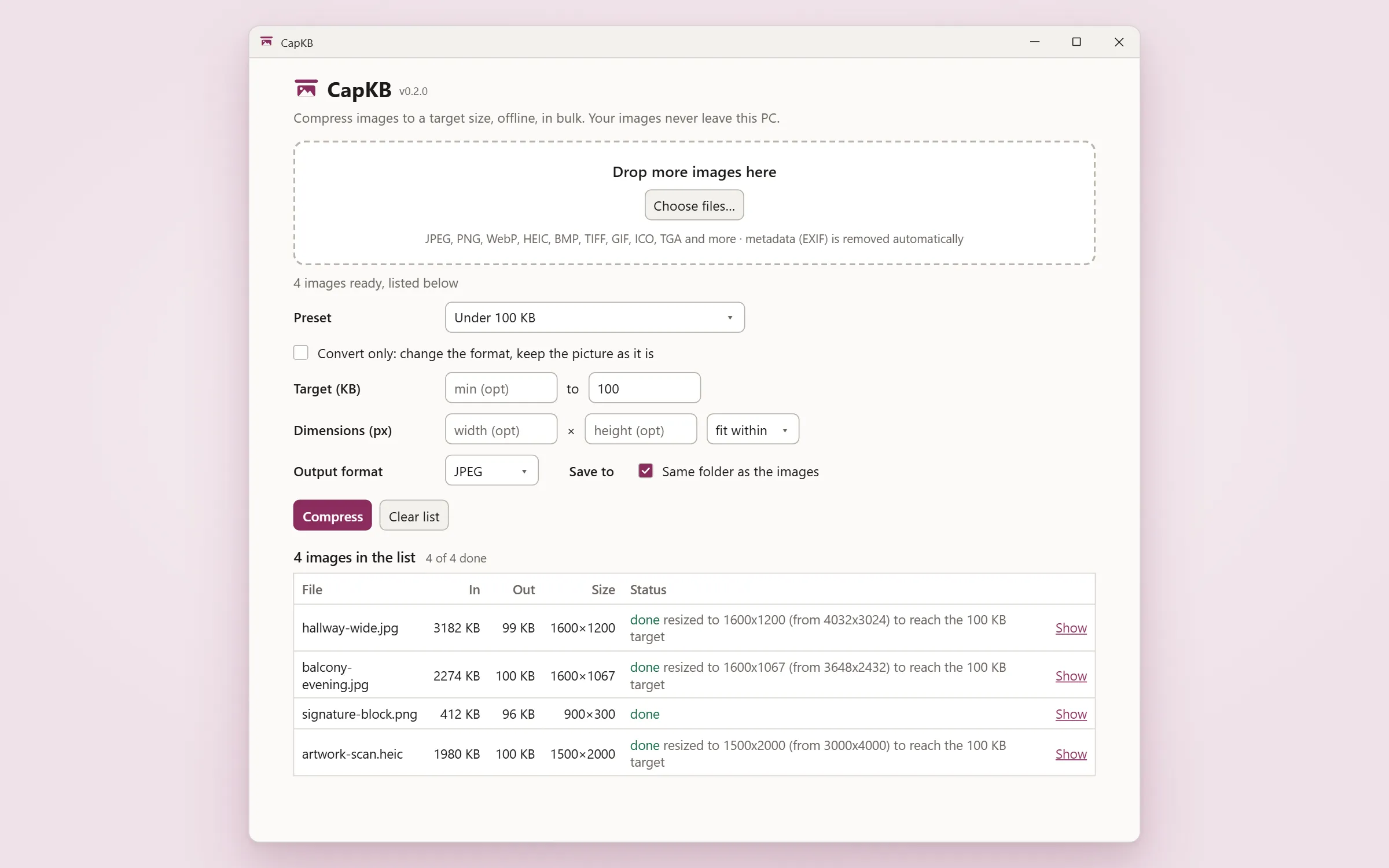
CapKB compresses images to a size you set, under 100 KB or a 20 to 50 KB range, at the best quality that fits, one file or a hundred. It reads iPhone HEIC, drops EXIF as it re-encodes, and does the whole job on your own machine. No account, no upload, no watermark.
A number, not a slider
You give CapKB a size, under 100 KB or a 20 to 50 KB range, and it finds the best quality that lands inside it. No guessing at a percentage and re-exporting until a form stops complaining.
Presets for the sizes forms ask for
Eighteen presets: four ranges with a floor, like 20 to 50 KB, and fourteen ceilings and sizes, like under 100 KB or a 400 by 400 profile picture. Pick the shape you need and drop the photo in. They are sizes, not any form's rules, and none has been tested against a live upload form.
iPhone photos go in as they are
HEIC and HEIF are read directly, including the rotation an iPhone records rather than bakes in, so a portrait photo stays portrait. This uses the codec Windows itself provides rather than one CapKB ships, so it depends on Microsoft's HEIF and HEVC extensions being installed, and Microsoft charges for the HEVC one on most machines.
A batch, and it never overwrites anything
Drop a folder's worth in at once. Your originals are never touched, and two files called scan.jpg from two different folders both survive into one destination.
EXIF comes off, because of how it works rather than as a step
Location, camera, date and the rest are gone from the output. There is no checkbox for it: every path re-encodes from decoded pixels, so metadata has nothing to travel on. This is about the file CapKB writes; it does not alter your original.
It resizes rather than ruining the picture, and it says which it did
Below a quality floor the search stops cutting quality and starts cutting pixels, and the row tells you it resized. If a target cannot be reached at all, that row says so instead of quietly writing something too big.
Questions
Do my images get uploaded?
No. CapKB has no network code: no account, no login, no telemetry, no update check and no licence call. The privacy page says what that does and does not establish.
My iPhone photos will not open. Why?
CapKB reads HEIC with the codec Windows itself provides rather than shipping its own. If Windows does not have it, CapKB says so and names what is needed: HEIF Image Extensions, which Microsoft gives away, and for most iPhone photos also HEVC Video Extensions, which Microsoft charges 0.99 USD for on most machines. That is Microsoft's charge, not ours, and it is a one-off for the whole machine.
Do the presets guarantee my form will accept the file?
No, and CapKB does not claim it. The presets are sizes, not any form's rules, and not one has been tested against a live upload form. They save you looking the number up. They are not a promise about someone else's website.
Does it change my original files?
Never. Output is written as a new file, always under a different name, and a name collision gets a suffix rather than an overwrite.
Does it work offline?
Yes, entirely. There is nothing for it to be online for.
What can I put in, and what comes out?
In: JPEG, PNG, WebP, HEIC, HEIF, BMP, TIFF, GIF, ICO, TGA, QOI and several scientific formats, 22 extensions in all. Out: JPEG, WebP, PNG, TIFF or BMP.
Can I just change the format without touching the picture?
Yes. Convert-only turns the size controls off entirely and re-encodes at the original dimensions.
Is there a macOS build?
Not yet. A Mac App Store version is built but not on sale, because its in-app purchase is not finished.
Privacy
What it collects: Nothing about you and nothing about your images. There is no backend, no account, no login, no analytics, no crash reporting and no update check, so there is no mechanism by which anything could be collected. The one thing CapKB writes about you is a local settings file in its own config folder with three fields: whether to save beside the source, the last output folder you chose, and the last preset you picked. What leaves your machine: Your images never leave this PC, and CapKB contains no network code: no HTTP client, no socket, no update check and no licence call. That was measured against the built program on 2026-09-01, not read off the source: CapKB's own process opened no outbound connection in any run, including one that put four photographs through it in six passes. The Windows component that draws its window does talk to Microsoft on its own account. CapKB turns that down as far as the platform allows, and one Microsoft endpoint remains that no setting of ours removes.
What it costs
A one-time purchase, not a subscription.
Pricing is set at release. It will be a one-time price, not a subscription.
Also from the studio
Questions or problems: support@hardboundstudio.com. A person reads every message.