
What it does
Reopen converts digital PDFs to Excel and Word, one file or a folder at a time. It sums every column it extracts and compares the result with the total the PDF printed, so a wrong extraction shows up instead of passing quietly. Nothing is uploaded and nothing is sent anywhere.
Tables out of a PDF and into a real workbook
Reopen reads ruled tables out of a digital PDF and writes each one to its own sheet, with numbers written as numbers rather than as text where they parse. A folder of PDFs converts in one run and each file reports as it finishes. Reopen also finds tables that have no ruled lines, by reading where the words sit on the page.
The totals tie-out check
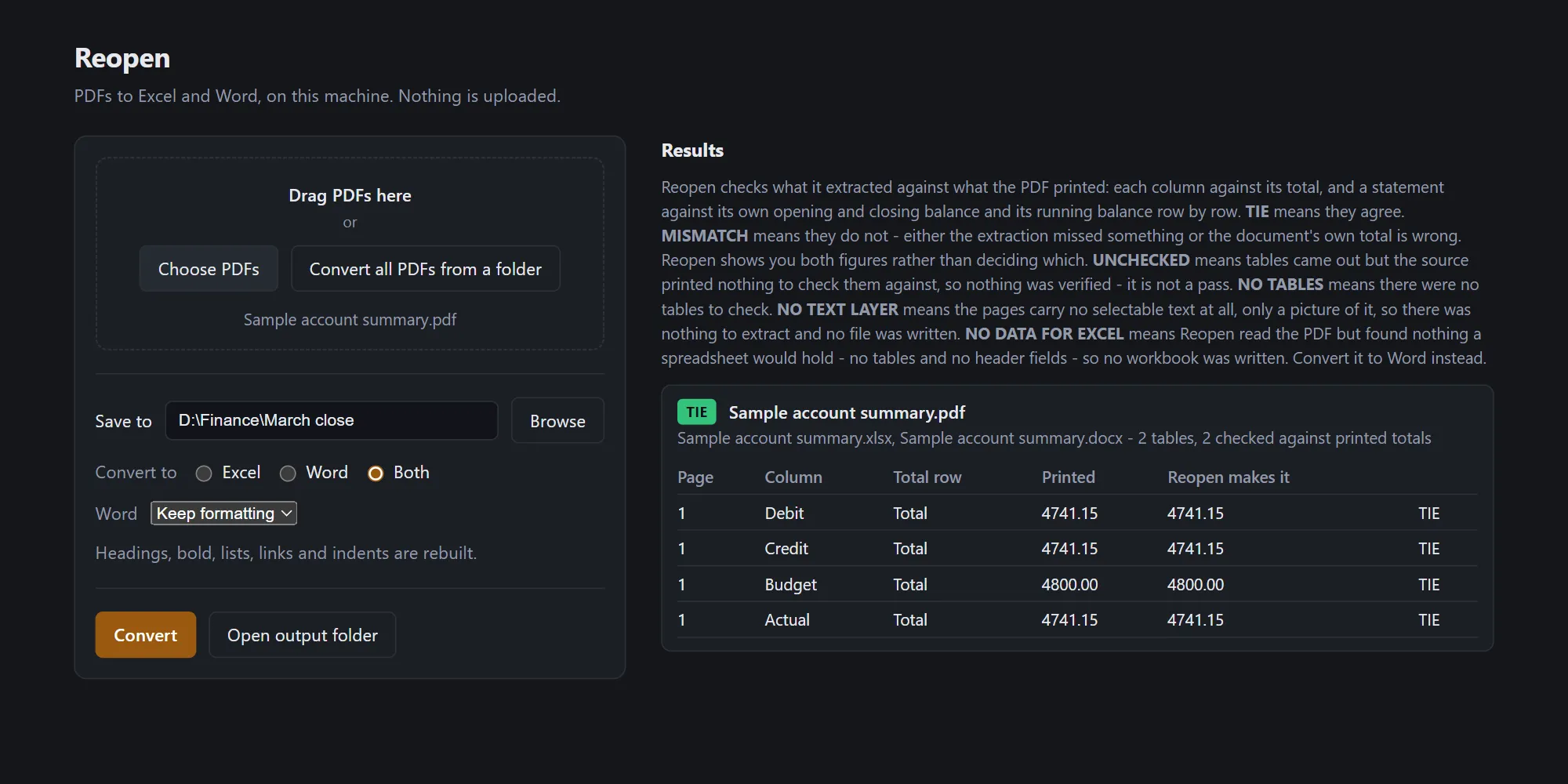
For every table it extracts, Reopen adds up each column and compares the result with the total the PDF itself printed. Agreement is reported as TIE, disagreement as MISMATCH with both figures side by side, and a table whose source printed no total is reported as UNCHECKED rather than as a pass.
It says so when it cannot read a PDF, instead of writing an empty file
A scanned PDF has no text layer. Reopen measures that before it writes anything, refuses the file by name, writes no output at all, and does not count it among the conversions. This exists because the opposite happened once: a 22-page scanned guide produced an empty document and the run reported two of two converted.
Word as well as Excel, and it says which kind of Word
The same run writes a document carrying the source's paragraphs and tables in reading order. This is text fidelity rather than layout fidelity: fonts, headings, bold, colour, lists, hyperlinks, images, headers and footers do not survive today.
Nothing is uploaded
The conversion runs in a program on your machine, and your documents are never sent anywhere: no accounts, no uploads, no analytics. The privacy page carries the precise version of this, including what it does not establish.
The statement balance check
When a statement prints an opening and a closing balance, Reopen checks that the opening balance plus the movements reaches the closing balance, and walks the running balance to name the first line that does not follow. A statement that does not print both balances is marked UNCHECKED, never passed.
Questions
Does my document get uploaded anywhere?
No. Reopen has no account, no login and no backend, and the code contains no networking library and no network call. The conversion happens in a program running on your machine.
Does it work on scanned PDFs?
No. Reopen reads PDFs that have a text layer. If you give it a scan it tells you so and writes nothing, rather than producing an empty file. Reading a scan needs text recognition, which Reopen does not do.
Will the Excel match my PDF exactly?
Reopen tells you when it does not. For every table it extracts it adds up each column and compares that with the total your PDF printed. If they disagree it says MISMATCH and shows you both numbers. If your PDF printed no total there was nothing to check against, and it says UNCHECKED rather than pretending that is a pass.
What about bank statements?
Reopen finds tables that have no ruled lines, such as a ledger or a statement, by reading where the words sit on the page. When a statement prints an opening and a closing balance, Reopen checks that the opening balance plus the movements reaches the closing balance, and walks the running balance to name the first line that does not follow. A statement that does not print both balances is marked UNCHECKED, never passed.
Does the Word file look like the PDF?
No. It carries the words, the paragraph breaks and the tables in reading order. It does not carry the fonts, the headings, the colours or the page layout.
Is it a subscription?
No. One payment.
What happens to the files it writes?
They are written to the folder you chose and Reopen does nothing else with them.
Is there a macOS build?
Not today.
Privacy
What it collects: Nothing. There is no account, no login, no licence server, no analytics, no crash reporting and no telemetry of any kind, so there is nothing collected to describe. What leaves your machine: Nothing that Reopen sends. There is no HTTP client, no socket and no URL in the converter, no update checker, no crash reporter and no analytics, and its window is granted no network permission at all. That is a reading of the code and the dependency tree rather than a measurement of the running program: this product's outbound traffic has not been watched. The Windows component that draws the window is Microsoft's, not ours, and may talk to Microsoft on its own account; a code read cannot rule that out and this answer does not pretend to.
Read the full Reopen privacy pageRead the Reopen licence agreement
What it costs
A one-time purchase, with a free trial.
A one-time purchase, not a subscription.
Also from the studio
Questions or problems: support@hardboundstudio.com. A person reads every message.